 ROS Index
Repository Summary
| Description | ROS 2 node for Raspberry Pi Mouse |
| Checkout URI | https://github.com/rt-net/raspimouse2.git |
| VCS Type | git |
| VCS Version | humble-devel |
| Last Updated | 2023-08-24 |
| Dev Status | MAINTAINED |
| CI status | No Continuous Integration |
| Released | RELEASED |
| Tags | robot raspberry-pi-mouse ros2 raspimouse |
| Contributing |
Help Wanted (0)
Good First Issues (0) Pull Requests to Review (0) |
Packages
| Name | Version |
|---|---|
| raspimouse | 1.1.2 |
| raspimouse_msgs | 1.1.2 |
README
Raspimouse Node
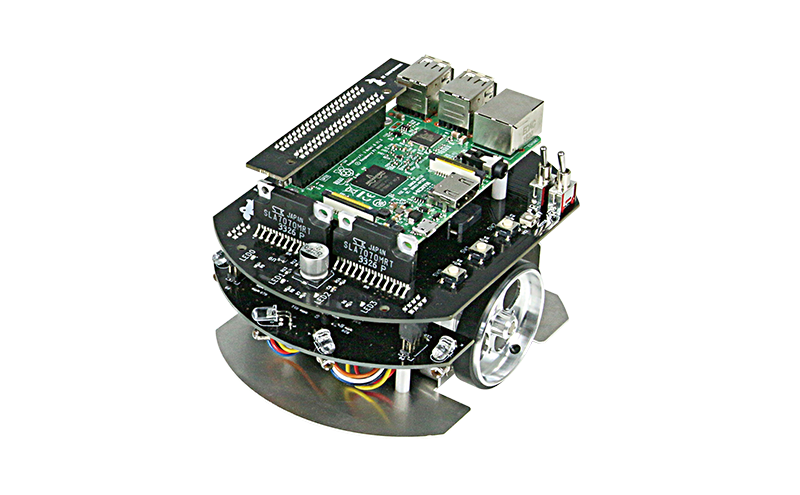
ROS 2 node for the Raspberry Pi Mouse.
Build Status
master branch

Source Build Status on ROS2 Buildfarm
| ROS 2 + Ubuntu | raspimouse | raspimouse_msgs |
|---|---|---|
Foxy + Focal (foxy-devel) |
||
Humble + Jammy (humble-devel) |
TODO | TODO |
Requirements
- Raspberry Pi Mouse
- https://rt-net.jp/products/raspberrypimousev3/
- RT Robot Shop
- Linux OS
- Ubuntu server 20.04
- https://ubuntu.com/download/raspberry-pi
- Device Driver
- ROS
Installation
Binary Insallation
$ sudo apt install ros-$ROS_DISTRO-raspimouse
Source Build
$ cd ~/ros2_ws/src
# Clone package
$ git clone -b $ROS_DISTRO-devel https://github.com/rt-net/raspimouse2

# Install dependencies
$ rosdep install -r -y -i --from-paths .

# Build & Install
$ cd ~/ros2_ws
$ colcon build --symlink-install
$ source ~/ros2_ws/install/setup.bash
QuickStart
# Terminal 1
$ source ~/ros2_ws/install/setup.bash
$ ros2 launch raspimouse raspimouse.launch.py

# Terminal 2
$ source ~/ros2_ws/install/setup.bash
# Set buzzer frequency
$ ros2 topic pub -1 /buzzer std_msgs/msg/Int16 '{data: 1000}'
$ ros2 topic pub -1 /buzzer std_msgs/msg/Int16 '{data: 0}'
# or rotate motors
$ ros2 service call /motor_power std_srvs/SetBool '{data: true}'
$ ros2 topic pub -1 /cmd_vel geometry_msgs/Twist '{linear: {x: 0.1, y: 0, z: 0}, angular: {x: 0, y: 0, z: 0.05}}'
# Shutdown
$ ros2 lifecycle set raspimouse shutdown
Node Description
This is a managed-lifecycle node. The node must be configured and activated after being launched before the robot can be used. If running the node manually, after launching the node execute the following command to configure it:
$ ros2 lifecycle set raspimouse configure
If configuration succeeds, execute the following command to activate the node:
$ ros2 lifecycle set raspimouse activate
The robot can now be controlled and sensor information will be published.
The node can be deactivated using the following command:
$ ros2 lifecycle set raspimouse deactivate
This will disable publishing sensor data and stop the motors.
When the node is active, motor functionality can be tested by turning on the motors and sending a velocity command.
$ ros2 service call /motor_power std_srvs/SetBool '{data: true}'
$ ros2 topic pub -1 /cmd_vel geometry_msgs/Twist '{linear: {x: 0.1, y: 0, z: 0}, angular: {x: 0, y: 0, z: 0.05}}'
Odometry information can be checked by echoing the odom topic.
$ ros2 topic echo /odom
Similarly other sensor information can also be viewed by echoing the relevant topic.
Topics
Subscribed
-
buzzerType:
std_msgs/Int16Used to control the buzzer. Provide a value in Hertz and the buzzer will emit that tone.
-
cmd_velType:
geometry_msgs/TwistControls the motors. Specify the forward and turning speeds of the robot.
-
ledsType:
raspimouse_msgs/LedsTurns the four LEDs on the front of the robot on and off.
Published
-
light_sensorsType:
raspimouse_msgs/LightSensorsProvides the raw values from the light sensors on the front of the robot.
-
odomType:
nav_msgs/OdometryProvides odometry. If hardware pulse counters are available and the
use_pulse_countersparameter is set totrue, the odometry is calculated from the motor control pulse counts. Otherwise, the odometry is estimated based on the velocity commands given to the robot and elapsed time. -
switchesType:
raspimouse_msgs/SwitchesProvides the status of each of the three push switches on the side of the robot.
Services
-
motor_powerType:
std_srvs/SetBoolCall this service and pass
trueto enable the motors. Passfalseto disable the motors.
Parameters
-
odometry_scale_left_wheelType:
doubleDefault:
1.0Use to adjust the odometry input from the left wheel (when using pulse counters to calculate odometry). This is used to account for slight differences in wheel diameter and wheel slip between the left and right wheels.
-
odometry_scale_right_wheelType:
doubleDefault:
1.0Use to adjust the odometry input from the right wheel (when using pulse counters to calculate odometry). This is used to account for slight differences in wheel diameter and wheel slip between the left and right wheels.
-
use_light_sensorsType:
booleanDefault:
trueEnable or disable the light sensors on the front of the robot.
-
use_pulse_countersType:
booleanDefault:
falseUse hardware pulse counters as the odometry source. When set to true, hardware pulse counters will be used only if present.
-
wheel_diameterType:
doubleDefault:
0.048Sets the diameter of the robot’s wheel. The unit is in meters.
-
wheel_treadType:
doubleDefault:
0.0925Sets the distance between the wheels. The unit is in meters.
-
pulses_per_revolutionType:
doubleDefault:
400.0Sets the number of pulses needed for 1 rotation of the used motor.
-
light_sensors_hzType:
doubleDefault:
100.0Sets the frequency of the publishing rate of the topic
light_sensors. The unit is in Hz. -
odom_hzType:
doubleDefault:
100.0Sets the frequency of the publishing rate of the topic
odom. The unit is in Hz. -
switches_hzType:
doubleDefault:
10.0Sets the frequency of the publishing rate of the topic
switches. The unit is in Hz. -
initial_motor_powerType:
boolDefault:
FalseSets the initial state of the motor. If set as
True, the motors will turn on when theraspimousenode becomes active. -
odom_frame_idType:
stringDefault:
odomSets the frame_id of the topic
odom. -
odom_child_frame_idType:
stringDefault:
base_footprintSets the child_frame_id of the topic
odom. -
odom_frame_prefixType:
stringDefault:
{empty}Adds prefix to the frames of the topic
odom. If set asmouse, the frame_id and the child_frame_id will bemouse/odomandmouse/baes_footprint.
License
This repository is licensed under the Apache 2.0, see LICENSE for details.
Contributors
- Geoffrey Biggs (@gbiggs), original author
- Shota Hirama (@shotahirama)
- Yutaka Kondo (@youtalk)
Contributions are always welcome!
CONTRIBUTING
Repository Summary
| Description | ROS 2 node for Raspberry Pi Mouse |
| Checkout URI | https://github.com/rt-net/raspimouse2.git |
| VCS Type | git |
| VCS Version | jazzy |
| Last Updated | 2025-04-23 |
| Dev Status | MAINTAINED |
| CI status | No Continuous Integration |
| Released | RELEASED |
| Tags | robot raspberry-pi-mouse ros2 raspimouse |
| Contributing |
Help Wanted (0)
Good First Issues (0) Pull Requests to Review (0) |
Packages
| Name | Version |
|---|---|
| raspimouse | 2.0.0 |
| raspimouse_msgs | 2.0.0 |
README
raspimouse2

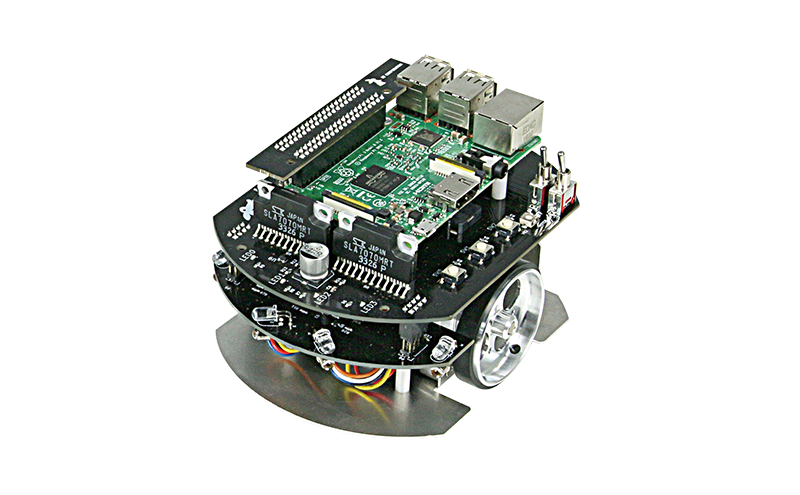
ROS 2 node for the Raspberry Pi Mouse.
Table of Contents
Supported ROS distributions
ROS 2
Requirements
- Raspberry Pi Mouse
- Linux OS
- Ubuntu server 24.04
- Device Driver
- ROS 2
Installation
Binary Installation
sudo apt install ros-$ROS_DISTRO-raspimouse
Source Build
# Create workspace directory
mkdir -p ~/ros2_ws/src && cd ~/ros2_ws/

# Clone package
git clone -b $ROS_DISTRO https://github.com/rt-net/raspimouse2

# Install dependencies
rosdep install -r -y -i --from-paths .

# Build & Install
cd ~/ros2_ws
colcon build --symlink-install
source ~/ros2_ws/install/setup.bash
QuickStart
Build and install the device driver in advance.
# Terminal 1
source ~/ros2_ws/install/setup.bash
ros2 launch raspimouse raspimouse.launch.py

# Terminal 2
source ~/ros2_ws/install/setup.bash
# Set buzzer frequency
ros2 topic pub -1 /buzzer std_msgs/msg/Int16 '{data: 1000}'
ros2 topic pub -1 /buzzer std_msgs/msg/Int16 '{data: 0}'
# or rotate motors
ros2 service call /motor_power std_srvs/SetBool '{data: true}'
ros2 topic pub -1 /cmd_vel geometry_msgs/msg/TwistStamped '{twist: {linear: {x: 0.05, y: 0, z: 0}, angular: {x: 0, y: 0, z: 0.05}}}'
# Shutdown
ros2 lifecycle set raspimouse shutdown
Packages
- raspimouse
- This package controls the Raspberry Pi Mouse using the device driver.
- raspimouse_msgs
- This package defines the custom message types used by the Raspberry Pi Mouse.
Topics
Subscribed
-
buzzer- Type:
std_msgs/Int16 - Used to control the buzzer. Provide a value in Hertz and the buzzer will emit that tone.
- Type:
-
cmd_vel- Type:
geometry_msgs/msg/TwistStamped - Controls the motors. Specify the forward and turning speeds of the robot.
- Type:
-
leds- Type:
raspimouse_msgs/Leds - Turns the four LEDs on the front of the robot on and off.
- Type:
Published
-
light_sensors- Type:
raspimouse_msgs/LightSensors - Provides the raw values from the light sensors on the front of the robot.
- Type:
-
odom- Type:
nav_msgs/Odometry - Provides odometry. If hardware pulse counters are available and the
use_pulse_countersparameter is set totrue, the odometry is calculated from the motor control pulse counts. Otherwise, the odometry is estimated based on the velocity commands given to the robot and elapsed time.
- Type:
-
switches- Type:
raspimouse_msgs/Switches - Provides the status of each of the three push switches on the side of the robot.
- Type:
Services
-
motor_power- Type:
std_srvs/SetBool - Call this service and pass
trueto enable the motors. Passfalseto disable the motors.
- Type:
Parameters
-
odometry_scale_left_wheel- Type:
double - Default:
1.0 - Use to adjust the odometry input from the left wheel (when using pulse counters to calculate odometry). This is used to account for slight differences in wheel diameter and wheel slip between the left and right wheels.
- Type:
-
odometry_scale_right_wheel- Type:
double - Default:
1.0 - Use to adjust the odometry input from the right wheel (when using pulse counters to calculate odometry). This is used to account for slight differences in wheel diameter and wheel slip between the left and right wheels.
- Type:
-
use_light_sensors- Type:
boolean - Default:
true - Enable or disable the light sensors on the front of the robot.
- Type:
-
use_pulse_counters- Type:
boolean - Default:
false - Use hardware pulse counters as the odometry source. When set to true, hardware pulse counters will be used only if present.
- Type:
-
wheel_diameter- Type:
double - Default:
0.048 - Sets the diameter of the robot’s wheel. The unit is in meters.
- Type:
-
wheel_tread- Type:
double - Default:
0.0925 - Sets the distance between the wheels. The unit is in meters.
- Type:
-
pulses_per_revolution- Type:
double - Default:
400.0 - Sets the number of pulses needed for 1 rotation of the used motor.
- Type:
-
light_sensors_hz- Type:
double - Default:
100.0 - Sets the frequency of the publishing rate of the topic
light_sensors. The unit is in Hz.
- Type:
-
odom_hz- Type:
double - Default:
100.0 - Sets the frequency of the publishing rate of the topic
odom. The unit is in Hz.
- Type:
-
switches_hz- Type:
double - Default:
10.0 - Sets the frequency of the publishing rate of the topic
switches. The unit is in Hz.
- Type:
-
initial_motor_power- Type:
bool - Default:
False - Sets the initial state of the motor. If set as
True, the motors will turn on when theraspimousenode becomes active.
- Type:
-
odom_frame_id- Type:
string - Default:
odom - Sets the frame_id of the topic
odom.
- Type:
-
odom_child_frame_id- Type:
string - Default:
base_footprint - Sets the child_frame_id of the topic
odom.
- Type:
-
odom_frame_prefix- Type:
string - Default:
{empty} - Adds prefix to the frames of the topic
odom. If set asmouse, the frame_id and the child_frame_id will bemouse/odomandmouse/baes_footprint.
- Type:
Node Description
This is a managed-lifecycle node. The node must be configured and activated after being launched before the robot can be used. If running the node manually, after launching the node execute the following command to configure it:
ros2 lifecycle set raspimouse configure
If configuration succeeds, execute the following command to activate the node:
ros2 lifecycle set raspimouse activate
The robot can now be controlled and sensor information will be published.
The node can be deactivated using the following command:
ros2 lifecycle set raspimouse deactivate
This will disable publishing sensor data and stop the motors.
When the node is active, motor functionality can be tested by turning on the motors and sending a velocity command.
ros2 service call /motor_power std_srvs/SetBool '{data: true}'
ros2 topic pub -1 /cmd_vel geometry_msgs/msg/TwistStamped '{twist: {linear: {x: 0.1, y: 0, z: 0}, angular: {x: 0, y: 0, z: 0.05}}}'
Odometry information can be checked by echoing the odom topic.
ros2 topic echo /odom
Similarly other sensor information can also be viewed by echoing the relevant topic.
License
(C) 2018 RT Corporation support@rt-net.jp
Each file is licensed as stated in their headers.
If no license is specified, the file is licensed under the Apache License, Version 2.0.
The full license text is available in the LICENSE file or at https://www.apache.org/licenses/LICENSE-2.0.
Contributing
- This software is open source, but its development is not open.
- This software is essentially provided as open source software on an “AS IS” (in its current state) basis.
- No free support is available for this software.
- Requests for bug fixes and corrections of typographical errors are always accepted; however, requests for additional features will be subject to our internal guidelines. For further details, please refer to the Contribution Guidelines.
Contributors
- Geoffrey Biggs (@gbiggs), original author
- Shota Hirama (@shotahirama)
- Yutaka Kondo (@youtalk)
Contributions are always welcome!
CONTRIBUTING
Repository Summary
| Description | ROS 2 node for Raspberry Pi Mouse |
| Checkout URI | https://github.com/rt-net/raspimouse2.git |
| VCS Type | git |
| VCS Version | jazzy |
| Last Updated | 2025-04-23 |
| Dev Status | MAINTAINED |
| CI status | No Continuous Integration |
| Released | RELEASED |
| Tags | robot raspberry-pi-mouse ros2 raspimouse |
| Contributing |
Help Wanted (0)
Good First Issues (0) Pull Requests to Review (0) |
Packages
| Name | Version |
|---|---|
| raspimouse | 2.0.0 |
| raspimouse_msgs | 2.0.0 |
README
raspimouse2
ROS 2 node for the Raspberry Pi Mouse.
Table of Contents
Supported ROS distributions
ROS 2
Requirements
- Raspberry Pi Mouse
- Linux OS
- Ubuntu server 24.04
- Device Driver
- ROS 2
Installation
Binary Installation
sudo apt install ros-$ROS_DISTRO-raspimouse
Source Build
# Create workspace directory
mkdir -p ~/ros2_ws/src && cd ~/ros2_ws/

# Clone package
git clone -b $ROS_DISTRO https://github.com/rt-net/raspimouse2

# Install dependencies
rosdep install -r -y -i --from-paths .

# Build & Install
cd ~/ros2_ws
colcon build --symlink-install
source ~/ros2_ws/install/setup.bash
QuickStart
Build and install the device driver in advance.
# Terminal 1
source ~/ros2_ws/install/setup.bash
ros2 launch raspimouse raspimouse.launch.py

# Terminal 2
source ~/ros2_ws/install/setup.bash
# Set buzzer frequency
ros2 topic pub -1 /buzzer std_msgs/msg/Int16 '{data: 1000}'
ros2 topic pub -1 /buzzer std_msgs/msg/Int16 '{data: 0}'
# or rotate motors
ros2 service call /motor_power std_srvs/SetBool '{data: true}'
ros2 topic pub -1 /cmd_vel geometry_msgs/msg/TwistStamped '{twist: {linear: {x: 0.05, y: 0, z: 0}, angular: {x: 0, y: 0, z: 0.05}}}'
# Shutdown
ros2 lifecycle set raspimouse shutdown
Packages
- raspimouse
- This package controls the Raspberry Pi Mouse using the device driver.
- raspimouse_msgs
- This package defines the custom message types used by the Raspberry Pi Mouse.
Topics
Subscribed
-
buzzer- Type:
std_msgs/Int16 - Used to control the buzzer. Provide a value in Hertz and the buzzer will emit that tone.
- Type:
-
cmd_vel- Type:
geometry_msgs/msg/TwistStamped - Controls the motors. Specify the forward and turning speeds of the robot.
- Type:
-
leds- Type:
raspimouse_msgs/Leds - Turns the four LEDs on the front of the robot on and off.
- Type:
Published
-
light_sensors- Type:
raspimouse_msgs/LightSensors - Provides the raw values from the light sensors on the front of the robot.
- Type:
-
odom- Type:
nav_msgs/Odometry - Provides odometry. If hardware pulse counters are available and the
use_pulse_countersparameter is set totrue, the odometry is calculated from the motor control pulse counts. Otherwise, the odometry is estimated based on the velocity commands given to the robot and elapsed time.
- Type:
-
switches- Type:
raspimouse_msgs/Switches - Provides the status of each of the three push switches on the side of the robot.
- Type:
Services
-
motor_power- Type:
std_srvs/SetBool - Call this service and pass
trueto enable the motors. Passfalseto disable the motors.
- Type:
Parameters
-
odometry_scale_left_wheel- Type:
double - Default:
1.0 - Use to adjust the odometry input from the left wheel (when using pulse counters to calculate odometry). This is used to account for slight differences in wheel diameter and wheel slip between the left and right wheels.
- Type:
-
odometry_scale_right_wheel- Type:
double - Default:
1.0 - Use to adjust the odometry input from the right wheel (when using pulse counters to calculate odometry). This is used to account for slight differences in wheel diameter and wheel slip between the left and right wheels.
- Type:
-
use_light_sensors- Type:
boolean - Default:
true - Enable or disable the light sensors on the front of the robot.
- Type:
-
use_pulse_counters- Type:
boolean - Default:
false - Use hardware pulse counters as the odometry source. When set to true, hardware pulse counters will be used only if present.
- Type:
-
wheel_diameter- Type:
double - Default:
0.048 - Sets the diameter of the robot’s wheel. The unit is in meters.
- Type:
-
wheel_tread- Type:
double - Default:
0.0925 - Sets the distance between the wheels. The unit is in meters.
- Type:
-
pulses_per_revolution- Type:
double - Default:
400.0 - Sets the number of pulses needed for 1 rotation of the used motor.
- Type:
-
light_sensors_hz- Type:
double - Default:
100.0 - Sets the frequency of the publishing rate of the topic
light_sensors. The unit is in Hz.
- Type:
-
odom_hz- Type:
double - Default:
100.0 - Sets the frequency of the publishing rate of the topic
odom. The unit is in Hz.
- Type:
-
switches_hz- Type:
double - Default:
10.0 - Sets the frequency of the publishing rate of the topic
switches. The unit is in Hz.
- Type:
-
initial_motor_power- Type:
bool - Default:
False - Sets the initial state of the motor. If set as
True, the motors will turn on when theraspimousenode becomes active.
- Type:
-
odom_frame_id- Type:
string - Default:
odom - Sets the frame_id of the topic
odom.
- Type:
-
odom_child_frame_id- Type:
string - Default:
base_footprint - Sets the child_frame_id of the topic
odom.
- Type:
-
odom_frame_prefix- Type:
string - Default:
{empty} - Adds prefix to the frames of the topic
odom. If set asmouse, the frame_id and the child_frame_id will bemouse/odomandmouse/baes_footprint.
- Type:
Node Description
This is a managed-lifecycle node. The node must be configured and activated after being launched before the robot can be used. If running the node manually, after launching the node execute the following command to configure it:
ros2 lifecycle set raspimouse configure
If configuration succeeds, execute the following command to activate the node:
ros2 lifecycle set raspimouse activate
The robot can now be controlled and sensor information will be published.
The node can be deactivated using the following command:
ros2 lifecycle set raspimouse deactivate
This will disable publishing sensor data and stop the motors.
When the node is active, motor functionality can be tested by turning on the motors and sending a velocity command.
ros2 service call /motor_power std_srvs/SetBool '{data: true}'
ros2 topic pub -1 /cmd_vel geometry_msgs/msg/TwistStamped '{twist: {linear: {x: 0.1, y: 0, z: 0}, angular: {x: 0, y: 0, z: 0.05}}}'
Odometry information can be checked by echoing the odom topic.
ros2 topic echo /odom
Similarly other sensor information can also be viewed by echoing the relevant topic.
License
(C) 2018 RT Corporation support@rt-net.jp
Each file is licensed as stated in their headers.
If no license is specified, the file is licensed under the Apache License, Version 2.0.
The full license text is available in the LICENSE file or at https://www.apache.org/licenses/LICENSE-2.0.
Contributing
- This software is open source, but its development is not open.
- This software is essentially provided as open source software on an “AS IS” (in its current state) basis.
- No free support is available for this software.
- Requests for bug fixes and corrections of typographical errors are always accepted; however, requests for additional features will be subject to our internal guidelines. For further details, please refer to the Contribution Guidelines.
Contributors
- Geoffrey Biggs (@gbiggs), original author
- Shota Hirama (@shotahirama)
- Yutaka Kondo (@youtalk)
Contributions are always welcome!
CONTRIBUTING
Repository Summary
| Description | ROS 2 node for Raspberry Pi Mouse |
| Checkout URI | https://github.com/rt-net/raspimouse2.git |
| VCS Type | git |
| VCS Version | jazzy |
| Last Updated | 2025-04-23 |
| Dev Status | MAINTAINED |
| CI status | No Continuous Integration |
| Released | RELEASED |
| Tags | robot raspberry-pi-mouse ros2 raspimouse |
| Contributing |
Help Wanted (0)
Good First Issues (0) Pull Requests to Review (0) |
Packages
| Name | Version |
|---|---|
| raspimouse | 2.0.0 |
| raspimouse_msgs | 2.0.0 |
README
raspimouse2
ROS 2 node for the Raspberry Pi Mouse.
Table of Contents
Supported ROS distributions
ROS 2
Requirements
- Raspberry Pi Mouse
- Linux OS
- Ubuntu server 24.04
- Device Driver
- ROS 2
Installation
Binary Installation
sudo apt install ros-$ROS_DISTRO-raspimouse
Source Build
# Create workspace directory
mkdir -p ~/ros2_ws/src && cd ~/ros2_ws/

# Clone package
git clone -b $ROS_DISTRO https://github.com/rt-net/raspimouse2

# Install dependencies
rosdep install -r -y -i --from-paths .

# Build & Install
cd ~/ros2_ws
colcon build --symlink-install
source ~/ros2_ws/install/setup.bash
QuickStart
Build and install the device driver in advance.
# Terminal 1
source ~/ros2_ws/install/setup.bash
ros2 launch raspimouse raspimouse.launch.py

# Terminal 2
source ~/ros2_ws/install/setup.bash
# Set buzzer frequency
ros2 topic pub -1 /buzzer std_msgs/msg/Int16 '{data: 1000}'
ros2 topic pub -1 /buzzer std_msgs/msg/Int16 '{data: 0}'
# or rotate motors
ros2 service call /motor_power std_srvs/SetBool '{data: true}'
ros2 topic pub -1 /cmd_vel geometry_msgs/msg/TwistStamped '{twist: {linear: {x: 0.05, y: 0, z: 0}, angular: {x: 0, y: 0, z: 0.05}}}'
# Shutdown
ros2 lifecycle set raspimouse shutdown
Packages
- raspimouse
- This package controls the Raspberry Pi Mouse using the device driver.
- raspimouse_msgs
- This package defines the custom message types used by the Raspberry Pi Mouse.
Topics
Subscribed
-
buzzer- Type:
std_msgs/Int16 - Used to control the buzzer. Provide a value in Hertz and the buzzer will emit that tone.
- Type:
-
cmd_vel- Type:
geometry_msgs/msg/TwistStamped - Controls the motors. Specify the forward and turning speeds of the robot.
- Type:
-
leds- Type:
raspimouse_msgs/Leds - Turns the four LEDs on the front of the robot on and off.
- Type:
Published
-
light_sensors- Type:
raspimouse_msgs/LightSensors - Provides the raw values from the light sensors on the front of the robot.
- Type:
-
odom- Type:
nav_msgs/Odometry - Provides odometry. If hardware pulse counters are available and the
use_pulse_countersparameter is set totrue, the odometry is calculated from the motor control pulse counts. Otherwise, the odometry is estimated based on the velocity commands given to the robot and elapsed time.
- Type:
-
switches- Type:
raspimouse_msgs/Switches - Provides the status of each of the three push switches on the side of the robot.
- Type:
Services
-
motor_power- Type:
std_srvs/SetBool - Call this service and pass
trueto enable the motors. Passfalseto disable the motors.
- Type:
Parameters
-
odometry_scale_left_wheel- Type:
double - Default:
1.0 - Use to adjust the odometry input from the left wheel (when using pulse counters to calculate odometry). This is used to account for slight differences in wheel diameter and wheel slip between the left and right wheels.
- Type:
-
odometry_scale_right_wheel- Type:
double - Default:
1.0 - Use to adjust the odometry input from the right wheel (when using pulse counters to calculate odometry). This is used to account for slight differences in wheel diameter and wheel slip between the left and right wheels.
- Type:
-
use_light_sensors- Type:
boolean - Default:
true - Enable or disable the light sensors on the front of the robot.
- Type:
-
use_pulse_counters- Type:
boolean - Default:
false - Use hardware pulse counters as the odometry source. When set to true, hardware pulse counters will be used only if present.
- Type:
-
wheel_diameter- Type:
double - Default:
0.048 - Sets the diameter of the robot’s wheel. The unit is in meters.
- Type:
-
wheel_tread- Type:
double - Default:
0.0925 - Sets the distance between the wheels. The unit is in meters.
- Type:
-
pulses_per_revolution- Type:
double - Default:
400.0 - Sets the number of pulses needed for 1 rotation of the used motor.
- Type:
-
light_sensors_hz- Type:
double - Default:
100.0 - Sets the frequency of the publishing rate of the topic
light_sensors. The unit is in Hz.
- Type:
-
odom_hz- Type:
double - Default:
100.0 - Sets the frequency of the publishing rate of the topic
odom. The unit is in Hz.
- Type:
-
switches_hz- Type:
double - Default:
10.0 - Sets the frequency of the publishing rate of the topic
switches. The unit is in Hz.
- Type:
-
initial_motor_power- Type:
bool - Default:
False - Sets the initial state of the motor. If set as
True, the motors will turn on when theraspimousenode becomes active.
- Type:
-
odom_frame_id- Type:
string - Default:
odom - Sets the frame_id of the topic
odom.
- Type:
-
odom_child_frame_id- Type:
string - Default:
base_footprint - Sets the child_frame_id of the topic
odom.
- Type:
-
odom_frame_prefix- Type:
string - Default:
{empty} - Adds prefix to the frames of the topic
odom. If set asmouse, the frame_id and the child_frame_id will bemouse/odomandmouse/baes_footprint.
- Type:
Node Description
This is a managed-lifecycle node. The node must be configured and activated after being launched before the robot can be used. If running the node manually, after launching the node execute the following command to configure it:
ros2 lifecycle set raspimouse configure
If configuration succeeds, execute the following command to activate the node:
ros2 lifecycle set raspimouse activate
The robot can now be controlled and sensor information will be published.
The node can be deactivated using the following command:
ros2 lifecycle set raspimouse deactivate
This will disable publishing sensor data and stop the motors.
When the node is active, motor functionality can be tested by turning on the motors and sending a velocity command.
ros2 service call /motor_power std_srvs/SetBool '{data: true}'
ros2 topic pub -1 /cmd_vel geometry_msgs/msg/TwistStamped '{twist: {linear: {x: 0.1, y: 0, z: 0}, angular: {x: 0, y: 0, z: 0.05}}}'
Odometry information can be checked by echoing the odom topic.
ros2 topic echo /odom
Similarly other sensor information can also be viewed by echoing the relevant topic.
License
(C) 2018 RT Corporation support@rt-net.jp
Each file is licensed as stated in their headers.
If no license is specified, the file is licensed under the Apache License, Version 2.0.
The full license text is available in the LICENSE file or at https://www.apache.org/licenses/LICENSE-2.0.
Contributing
- This software is open source, but its development is not open.
- This software is essentially provided as open source software on an “AS IS” (in its current state) basis.
- No free support is available for this software.
- Requests for bug fixes and corrections of typographical errors are always accepted; however, requests for additional features will be subject to our internal guidelines. For further details, please refer to the Contribution Guidelines.
Contributors
- Geoffrey Biggs (@gbiggs), original author
- Shota Hirama (@shotahirama)
- Yutaka Kondo (@youtalk)
Contributions are always welcome!