 ROS Index
|
|
Repository Summary
| Description | ROS 2 based robot learning platform |
| Checkout URI | https://github.com/kallaspriit/rosbot.git |
| VCS Type | git |
| VCS Version | main |
| Last Updated | 2022-01-27 |
| Dev Status | UNMAINTAINED |
| CI status | No Continuous Integration |
| Released | UNRELEASED |
| Tags | No category tags. |
| Contributing |
Help Wanted (0)
Good First Issues (0) Pull Requests to Review (0) |
Packages
| Name | Version |
|---|---|
| chat | 0.1.0 |
| client_service | 0.0.0 |
| number_pubsub | 0.0.0 |
| tutorial_interfaces | 0.0.0 |
| odrive_interfaces | 0.0.1 |
| odrive_ros2 | 0.0.1 |
| odrive_bringup | 0.1.0 |
| odrive_description | 0.1.0 |
| odrive_hardware_interface | 0.1.0 |
| odrive_ros2_control | 0.1.0 |
| rplidar_ros2 | 1.0.1 |
| joy_teleop | 1.2.1 |
| key_teleop | 1.2.1 |
| mouse_teleop | 1.2.1 |
| teleop_tools | 1.2.1 |
| teleop_tools_msgs | 1.2.1 |
| bno055 | 0.1.1 |
| rosbot_bringup | 0.1.0 |
| rosbot_description | 0.1.0 |
| teleop_twist_joy | 2.4.3 |
README
ROSBOT
ROS 2 based robot learning platform.
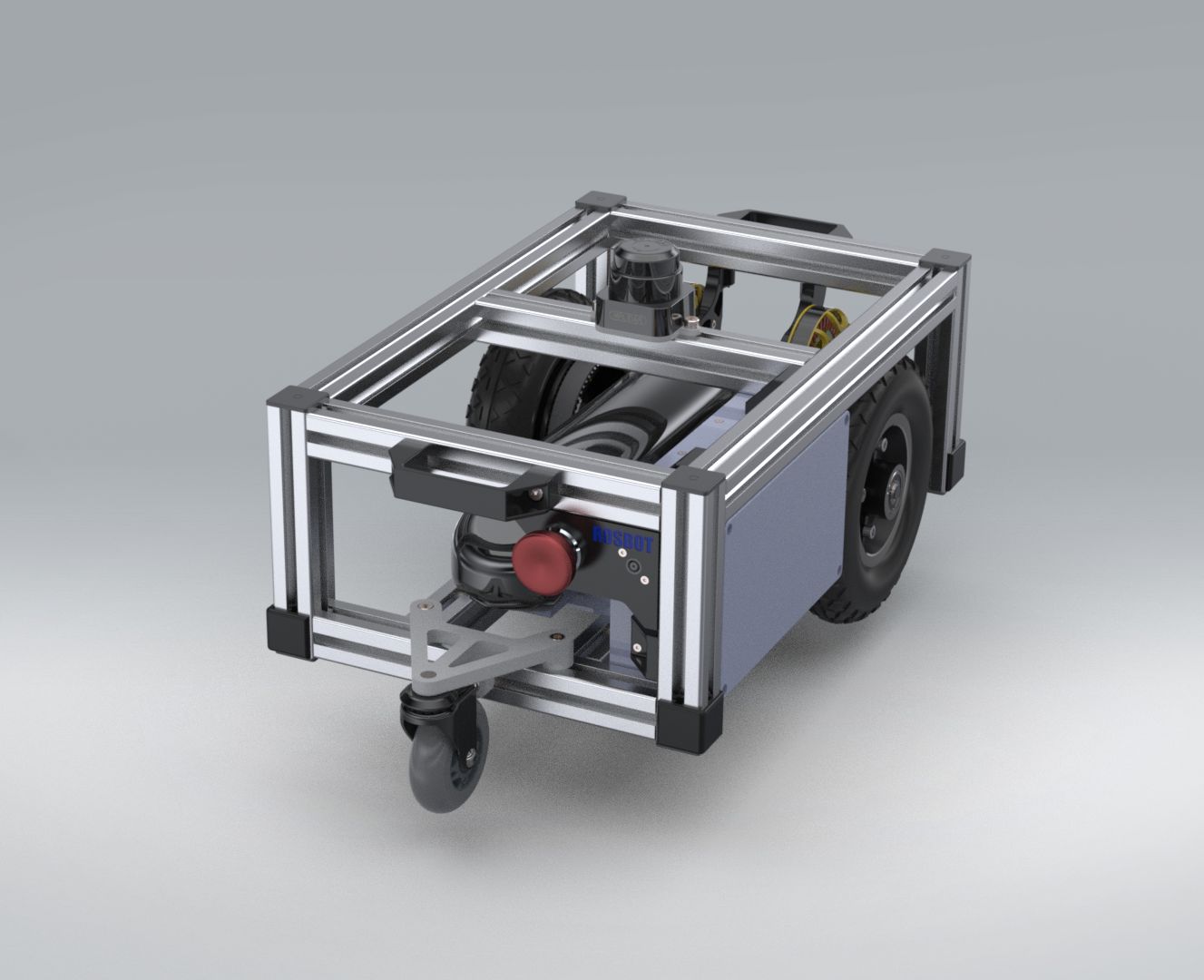
Click the image to video showing robot design and navigation in action
Bill of Materials
The BOM has not been designed for easy replication but most all used components and alternatives considered are there with respective links of where were they purchased so maybe it helps someone putting together a similar build :)
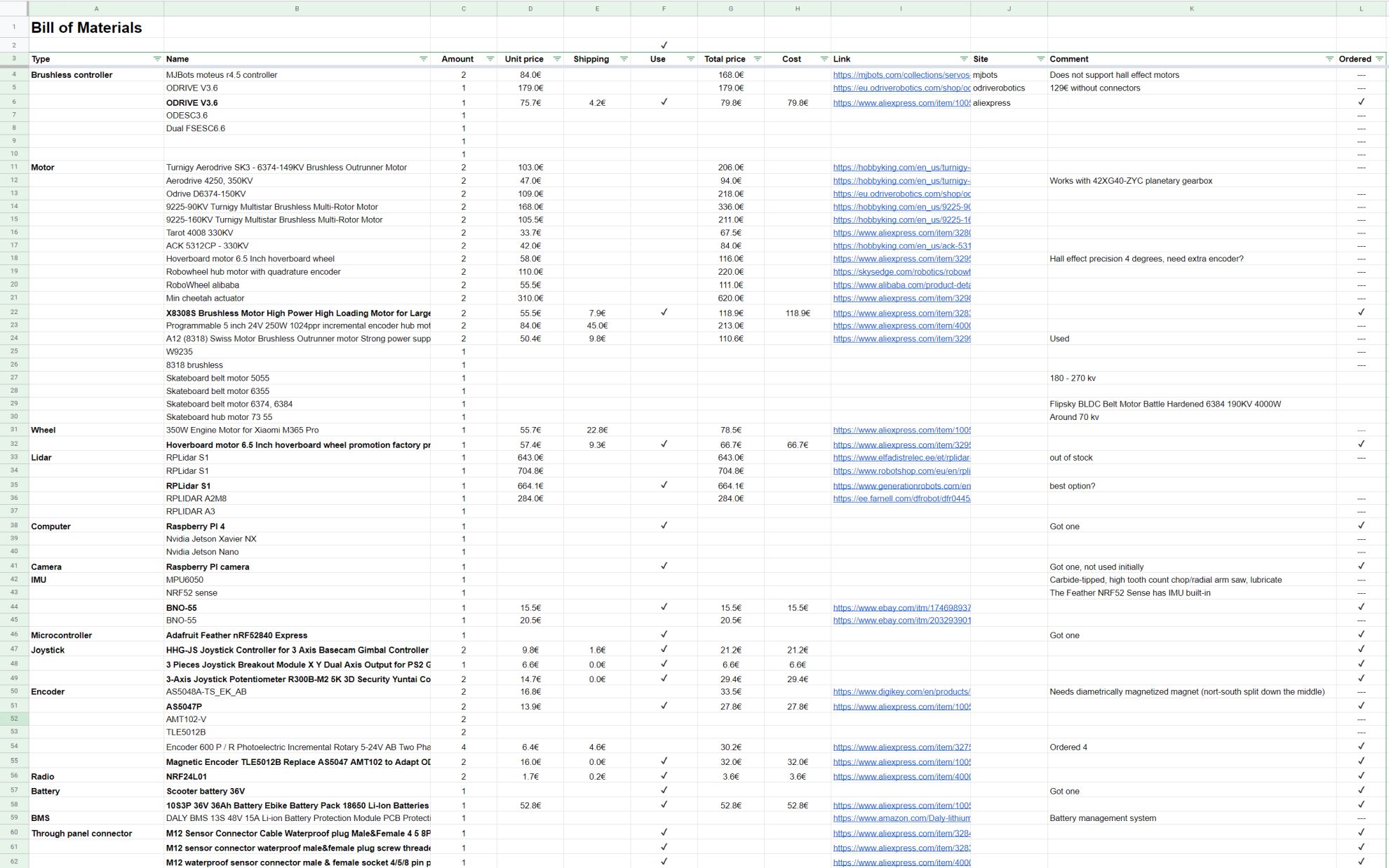
Click the image to open BOM
Run main rosbot/ros workspace
Disclaimer
The following documentation is various commands and information that I’ve written over the time the robot was in development and everything is not up to date or relevant but maybe it helps someone.
- Add user to usb serial and input groups
sudo usermod -a -G input ubuntusudo usermod -a -G dialout ubuntusudo usermod -a -G tty ubuntu
- Build rosbot (on both the robot and the remote PC)
-
cd ~/rosbot/rosto open workspace -
rosdep install -i --from-path src --rosdistro foxy -yto install dependencies -
git pull && colcon buildto pull changes and build workspace
-
- Launch rosbot on the robot
- First build it if there have been any changes
- Open new terminal
-
cd ~/rosbot/rosto open workspace -
. install/local_setup.bashto load workspace overlay (on both robot and remote pc) -
ros2 launch odrive_bringup rosbot.launch.pyto launch rosbot (run on robot) -
ros2 launch odrive_bringup rviz.launch.pyto launch rviz (run on remote pc)
- Run joystick teleop
- Open new terminal
-
. install/local_setup.bashto load workspace overlay -
ros2 launch teleop_twist_joy teleop.launch.py joy_config:='rosbot_xbox_bluetooth' cmd_vel:=/diff_drive_controller/cmd_vel_unstampedto launch joystick teleop - Hold down left trigger (button 6) and use left and right joysticks to control speed and rotation
- Hold down right trigger (button 7) for boost (faster movements)
- Launch odrive manual control (for testing only)
- Open new terminal
-
. install/local_setup.bashto load workspace overlay -
ros2 launch odrive_bringup odrive.launch.pyto launch odrive test () ros2 topic pub -r 100 /left_wheel_joint_velocity_controller/commands std_msgs/Float64MultiArray "data: [1]"ros2 topic pub -r 100 /right_wheel_joint_velocity_controller/commands std_msgs/Float64MultiArray "data: [-1]"-
ros2 launch teleop_twist_joy teleop.launch.py joy_config:='rosbot_xbox_bluetooth' cmd_vel:=/diff_drive_controller/cmd_vel_unstampedto launch joystick teleop - Hold down left trigger (button 6) and use left and right joysticks to control speed and rotation
- Launch usb xbox joystick teleop that publishes to
/cmd_velros2 launch teleop_twist_joy teleop.launch.py cmd_vel:=cmd_vel joy_config:=rosbot_xbox_usb
Debugging
- Debugging
-
ros2 topic echo /joint_statesto show joint states including velocity etc -
ros2 topic echo /dynamic_joint_statesto show dynamic joint states including axis error etc -
ros2 run tf2_tools view_frames.pyto generateframes.pdfframe tree -
rqtto open RQT, add plugins such asTopics > Topic Monitor -
ros2 run xacro xacro ./src/rosbot_description/urdf/rosbot.urdf.xacroto debug what’s wrong with URDF file -
ros2 run tf2_ros tf2_echo odom base_linkto verify transforms from odom to base_link- At time 1634580767.596875940
- Translation: [6.986, -2.328, 0.000]
- Rotation: in Quaternion [0.000, 0.000, -0.210, 0.978]
- At time 1634580768.594622939
- Translation: [7.108, -2.383, 0.000]
- Rotation: in Quaternion [0.000, 0.000, -0.213, 0.977]
- At time 1634580767.596875940
Joystick teleop
- https://index.ros.org/p/teleop_twist_joy/github-ros2-teleop_twist_joy/
- https://github.com/ros2/teleop_twist_joy/tree/foxy/
- http://wiki.ros.org/joy
- https://github.com/medusalix/xow need xow to use xbox bluetooth controller
- Configure XOW to use xbox controller over bluetooth
-
sudo apt install cabextractto install dependencies git clone https://github.com/medusalix/xowcd xowmake BUILD=RELEASEsudo make installsudo systemctl enable xowsudo systemctl start xow-
sudo systemctl kill -s SIGUSR1 xowto enable XOW pairing mode (generally not needed)
-
- Disable ERTM
sudoedit /sys/module/bluetooth/parameters/disable_ertm- replace
NwithY - reboot
- Restart bluetooth
sudo service bluetooth restartsudo rmmod btusb
- Test controller
jstest /dev/input/js0
- Also disable ERTM permanently
- https://www.addictivetips.com/ubuntu-linux-tips/xbox-one-controllers-over-bluetooth-linux/
-
sudo apt install dkms git linux-headers-uname -r`` git clone https://github.com/atar-axis/xpadneo.gitcd xpadneosudo ./install.sh- reboot
- Disable internal bluetooth when using dongle
sudoedit /boot/firmware/usrcfg.txt- add line
dtoverlay=disable-bluetooth - reboot
- check with
hciconfig -aandhcitool dev - does not seem to actually work..
- Connect to bluetooth xbox controller using terminal (on robot)
- https://simpleit.rocks/linux/shell/connect-to-bluetooth-from-cli/
- https://raspberrypi.stackexchange.com/questions/114586/rpi-4b-bluetooth-unavailable-on-ubuntu-20-04
- https://www.makeuseof.com/manage-bluetooth-linux-with-bluetoothctl/
sudo apt install bluez pi-bluetooth joystick- Append “include btcfg.txt” to
sudoedit /boot/firmware/usrcfg.txt - reboot
-
hciconfig -aorhcitool dev(from bluez) to check for bluetooth devices -
bluetoothctlto run interactive bluetooth controller scan on- wait for xbox controller (make it pair by holding the pair button, starts to blink rapidly)
-
trust XX:XX:XX:XX:XX:XXto trust the controller -
connect XX:XX:XX:XX:XX:XXto connect to the controller -
sudo chmod a+rw /dev/input/js0to give everyone read-write permissions to joystick -
sudo chmod a+rw /dev/input/event4to give everyone read-write permissions to joystick (sometimes it’s one of eventX)
- If the joystick
/dev/input/eventXdoes not have correct permissions then (this does not seem to actually work)-
sudo apt install input-utilsto installlsinputtool -
sudo lsinputto get list of inputs, note the vendor and product of “Xbox Wireless Controller” sudoedit 80-xbox-controller.rules- add
KERNEL=="event*", ATTRS{idProduct}=="02e0", ATTRS{idVendor}=="045e", MODE="0666"etc that mathes vendor and product
-
- Test joystick from terminal
sudo apt install joystickjstest /dev/input/js0ros2 run joy joy_enumerate_devices
- Test joystick visually
sudo apt install jstest-gtkjstest-gtk
- Test joystick messages
ros2 topic echo /joyros2 topic echo /cmd_velros2 topic echo /diff_drive_controller/cmd_vel_unstamped
Setup Gazebo simulator
sudo apt install ros-foxy-gazebo-ros-pkgs
Setup Raspberry PI UART
- https://askubuntu.com/questions/1254376/enable-uart-communication-on-pi4-ubuntu-20-04
- Create boot configuration backups
cd /boot/firmwaresudo cp usrcfg.txt usrconfig.backup.txtsudo cp cmdline.txt cmdline.backup.txt
- Disable console UART
- add
enable_uart=0to/boot/firmware/usrcfg.txt - remove
console=serial0,115200from/boot/firmware/cmdline.txt
- add
- Disable the Serial Service which used the miniUART
sudo systemctl stop serial-getty@ttyS0.servicesudo systemctl disable serial-getty@ttyS0.servicesudo systemctl mask serial-getty@ttyS0.service
- UART Pins
- Pin 8 TXD GPIO14
- Pin 10 RXD GPIO15
Setup ROS2 Navigation2 Nav2
- https://navigation.ros.org/getting_started/index.html
- Install dependencies
sudo apt install ros-foxy-navigation2 ros-foxy-nav2-bringup ros-foxy-cartographer ros-foxy-cartographer-ros ros-foxy-robot-localization ros-foxy-slam-toolbox ros-foxy-gazebo-ros-pkgs ros-foxy-xacro ros-foxy-slam-toolbox-
sudo apt install ros-foxy-turtlebot3*for testing on remote pc only
- Slam toolbox on the robot
- Use snap
slam-toolbox - It has optimizations in it that make it about 10x faster
- Use snap
- Run mapping and navigation
-
ros2 launch slam_toolbox online_async_launch.pyto launch slam toolbox mapper -
ros2 launch nav2_bringup navigation_launch.pyto run navigation2
-
Run navigation2_tutorials
- Clone and build
https://github.com/ros-planning/navigation2_tutorials.git - launch robot
ros2 launch sam_bot_description display.launch.py - Launch usbteleop
- Open new terminal
cd ~/rosbot/ros. install/local_setup.bashros2 launch teleop_twist_joy teleop.launch.py cmd_vel:=/demo/cmd_vel joy_config:=rosbot_xbox_usb- or without the /demo in modified version
- Launch slam_toolbox
- Open new terminal
ros2 launch slam_toolbox online_async_launch.py
Setup Arduino
- Install Arduino IDE
- Add
https://www.adafruit.com/package_adafruit_index.jsonto Arduino preferences additional boards URLs - Install board
Adafruit nRF52 - Install
pip3 install --user adafruit-nrfutil - Update bootloader
- https://learn.adafruit.com/introducing-the-adafruit-nrf52840-feather/update-bootloader
- Double press reset to enter DFU mode
- Install Micro-XRCE-DDS Agent
git clone https://github.com/eProsima/Micro-XRCE-DDS-Agent.gitcd Micro-XRCE-DDS-Agent && git checkout foxymkdir build && cd buildsource /opt/ros/dashing/setup.bash # to share libraries with ros2cmake ..makesudo make installsudo ldconfig /usr/local/lib/
Update cmake
cmake --versionsudo apt updatesudo apt install -y software-properties-common lsb-releasewget -O - https://apt.kitware.com/keys/kitware-archive-latest.asc 2>/dev/null | gpg --dearmor - | sudo tee /etc/apt/trusted.gpg.d/kitware.gpg >/dev/nullsudo apt-add-repository "deb https://apt.kitware.com/ubuntu/ $(lsb_release -cs) main"sudo apt updatesudo apt install kitware-archive-keyringsudo rm /etc/apt/trusted.gpg.d/kitware.gpgsudo apt updatesudo apt install cmakecmake --version
Build micro-ros on MBED
- https://github.com/micro-ROS/micro_ros_mbed
pip3 install catkin_pkg lark-parser empy colcon-common-extensions mbed-toolssudo apt install gcc-arm-none-eabi- clone repo and cd into it
mbed-tools deploymbed-tools compile -m LPC1768 -t GCC_ARM -f
Install ROS
- Enable universe (probably not needed)
sudo apt install software-properties-commonsudo add-apt-repository universe
- Add repository
sudo apt update && sudo apt install curl gnupg2 lsb-releasesudo curl -sSL https://raw.githubusercontent.com/ros/rosdistro/master/ros.key -o /usr/share/keyrings/ros-archive-keyring.gpg
- Add repository to sources list
echo "deb [arch=$(dpkg --print-architecture) signed-by=/usr/share/keyrings/ros-archive-keyring.gpg] http://packages.ros.org/ros2/ubuntu $(lsb_release -cs) main" | sudo tee /etc/apt/sources.list.d/ros2.list > /dev/null
- Install ROS
sudo apt updatesudo apt install ros-foxy-desktop
- Install autocomplete
sudo apt install -y python3-argcomplete
- Add sourcing ROS to bashrc
echo "source /opt/ros/foxy/setup.bash" >> ~/.bashrc
- Add colcom_cd to bashrc
echo "source /usr/share/colcon_cd/function/colcon_cd.sh" >> ~/.bashrcecho "export _colcon_cd_root=~/ros2_install" >> ~/.bashrc
- Check environment variables
printenv | grep -i ROS
- Set domain id (random number between 0-101 inclusive)
echo "export ROS_DOMAIN_ID=<your_domain_id>" >> ~/.bashrc
- Test ROS (open in separate terminals)
ros2 run demo_nodes_cpp talkerros2 run demo_nodes_py listener
- Install ros bag for data recording/playback
sudo apt-get install ros-galactic-ros2bag ros-galactic-rosbag2-storage-default-plugins
Install tools
- Install VSCode
sudo snap install --classic code
Install TurtleSim
- Install
sudo apt install ros-foxy-turtlesim
- Check the package installed
ros2 pkg executables turtlesim
- Start turtlesim
ros2 run turtlesim turtlesim_node
- Start teleop to control the turtle
ros2 run turtlesim turtle_teleop_key
Install RQT
- Install rqt
sudo apt updatesudo apt install ~nros-foxy-rqt*
- Run rqt
rqt
- Add service called
select Plugins > Services > Service Caller- Call
/spawnwithx=1.0, y=1.0, name='turtle2'
- Remap control to turtle 2
ros2 run turtlesim turtle_teleop_key --ros-args --remap turtle1/cmd_vel:=turtle2/cmd_vel
- Render rtq graph
rqt_graph- can also add to
rtqbyPlugins > Introspection > Nodes Graph
ROS Command line
- Run node
ros2 run turtlesim turtlesim_noderos2 run turtlesim turtle_teleop_key-
ros2 run turtlesim turtlesim_node --ros-args --log-level WARNto run with custom log level
- List resources
ros2 node listros2 topic list-
ros2 topic list -tto also show message types ros2 service list-
ros2 service list -tto also show service types ros2 action listros2 param list
- Get node info
ros2 node info /my_turtle
- Show data published to topic
-
ros2 topic echo /turtle1/cmd_velto see velocity commands -
ros2 topic echo /turtle1/poseto see changing pose
-
- Get topic info
ros2 topic info /turtle1/cmd_vel
- Show messsage interface
ros2 interface show geometry_msgs/msg/Twist
- Publish message to topic
-
ros2 topic pub <topic_name> <msg_type> '<args>'where args is in YAML syntax -
ros2 topic pub --once /turtle1/cmd_vel geometry_msgs/msg/Twist "{linear: {x: 2.0, y: 0.0, z: 0.0}, angular: {x: 0.0, y: 0.0, z: 1.8}}"publishes once -
ros2 topic pub --rate 1 /turtle1/cmd_vel geometry_msgs/msg/Twist "{linear: {x: 2.0, y: 0.0, z: 0.0}, angular: {x: 0.0, y: 0.0, z: 1.8}}"publishes continuosly at 1Hz
-
- Show how often data is published to a topic
ros2 topic hz /turtle1/pose
- Get service type info
ros2 service type <service_name>ros2 service type /clear
- Find service by type
ros2 service find <type_name>ros2 service find std_srvs/srv/Empty
- Show service type structure
-
ros2 interface show <type_name>.srvwhere request and response structure is separated by — ros2 interface show std_srvs/srv/Empty.srvros2 interface show turtlesim/srv/TeleportAbsolute.srvros2 interface show turtlesim/srv/Spawn
-
- Call service
ros2 service call <service_name> <service_type> <arguments>ros2 service call /clear std_srvs/srv/Emptyros2 service call /spawn turtlesim/srv/Spawn "{x: 2, y: 2, theta: 0.2, name: ''}"
- Get param list
ros2 param list
- Get param value
ros2 param get <node_name> <parameter_name>ros2 param get /turtlesim background_g
- Set param value
ros2 param set <node_name> <parameter_name> <value>ros2 param set /turtlesim background_r 150
- Dump node parameters
ros2 param dump <node_name>ros2 param dump /turtlesim
- Start node using parameters from dumped file
ros2 run <package_name> <executable_name> --ros-args --params-file <file_name>ros2 run turtlesim turtlesim_node --ros-args --params-file ./turtlesim.yaml
- Get list of node actions
ros2 node info /turtlesimros2 node info /teleop_turtle
- Get list of all actions
ros2 action list-
ros2 action list -tto also show action types
- Get action info
ros2 action info /turtle1/rotate_absolute
- Get action interface info
ros2 interface show turtlesim/action/RotateAbsolute
- Call action
ros2 action send_goal <action_name> <action_type> <values>ros2 action send_goal /turtle1/rotate_absolute turtlesim/action/RotateAbsolute "{theta: 1.57}"-
ros2 action send_goal /turtle1/rotate_absolute turtlesim/action/RotateAbsolute "{theta: 3.14}" --feedbackto also get feedback
- Run rqt console
ros2 run rqt_console rqt_console
- Start node
ros2 run rqt_console rqt_console
- Launch launch file
ros2 topic pub -r 1 /turtlesim1/turtle1/cmd_vel geometry_msgs/msg/Twist "{linear: {x: 2.0, y: 0.0, z: 0.0}, angular: {x: 0.0, y: 0.0, z: -1.8}}"
- Record topic to bag
-
ros2 bag record <topic_name>to record a topic ros2 bag record /turtle1/cmd_vel-
ros2 bag record -o subset /turtle1/cmd_vel /turtle1/posetop choose filenamesubsetand record multiple topics
-
- Get bag info
ros2 bag info <bag_file_name>ros2 bag info subset
- Play back bag recording
ros2 bag play <bag_file_name>ros2 bag play subset
Example launch file
Starts two turtlesim nodes with different namespace names and a mimic node that makes the second turtle mimic first one.
from launch import LaunchDescription
from launch_ros.actions import Node

def generate_launch_description():
    return LaunchDescription([
        Node(
            package='turtlesim',
            namespace='turtlesim1',
            executable='turtlesim_node',
            name='sim'
        ),
        Node(
            package='turtlesim',
            namespace='turtlesim2',
            executable='turtlesim_node',
            name='sim'
        ),
        Node(
            package='turtlesim',
            executable='mimic',
            name='mimic',
            remappings=[
                ('/input/pose', '/turtlesim1/turtle1/pose'),
                ('/output/cmd_vel', '/turtlesim2/turtle1/cmd_vel'),
            ]
        )
    ])
TMUX terminal splitter
- Install
sudo apt install tmux
- Start
tmux
- Split terminal
- horizonal
ctrl+b % - vertical
ctrl+b "
- horizonal
- Manage windows
- create
ctrl+b c - close
exit - rename
ctrl+b ,
- create
- Navigate
- between panels
ctrl+b ARROWS - between windows
ctrl+b Nwhere first N=0, second N=1 etc
- between panels
Base ros setup
https://docs.ros.org/en/foxy/Installation/Ubuntu-Install-Binary.html#linux-install-binary-install-missing-dependencies
/opt/ros/foxy
- sudo apt install -y python3-rosdep
- rosdep update
- rosdep install –from-paths /opt/ros/foxy/share –ignore-src –rosdistro foxy -y –skip-keys “console_bridge fastcdr fastrtps osrf_testing_tools_cpp poco_vendor rmw_connextdds rti-connext-dds-5.3.1 tinyxml_vendor tinyxml2_vendor urdfdom urdfdom_headers”
Creating workspace
https://docs.ros.org/en/foxy/Tutorials/Workspace/Creating-A-Workspace.html
- mkdir -p ~/dev_ws/src
- cd ~/dev_ws/src
- git clone https://github.com/ros/ros_tutorials.git -b foxy-devel
- rosdep install -i –from-path src –rosdistro foxy -y
- colcon build
- open new terminal to source overlay
- cd ~/dev_ws
Build package
- create workspace directory
mkdir ros2_wsetc - create “src” in this directory
- copy the library/package into src
-
rosdep install -i --from-path src --rosdistro foxy -yto install dependencies - cd back to workspace and run
colcon buildto build the package
Teleop robot controller
- https://github.com/ros-teleop/teleop_tools/tree/foxy-devel
- https://ubuntu.com/blog/the-teleop_tools-arrive-in-ros-2-dashing
ros2 run mouse_teleop mouse_teleopros2 run mouse_teleop mouse_teleop --ros-args -r holonomic:=trueros2 topic echo /mouse_vel
Run experiments/test_odrive_ros2 package
cd ~/rosbot/experiments/test_odrive_ros2/ros2 run odrive_ros2 odrive_noderos2 service call /connect_odrive std_srvs/srv/Trigger-
ros2 service call /request_state odrive_interfaces/srv/AxisState "{axis: 0, state: 8}"(not needed if started in closed loop control) ros2 service call /velocity_cmd odrive_interfaces/srv/VelocityControl "{axis: 0, turns_s: 0.5}"-
ros2 topic echo /barrery_percentage(typo.. and not sure of the format, returns something like 3.5) ros2 topic echo /joint_state
RVIZ2
- https://www.stereolabs.com/docs/ros2/rviz2/
Run experiments/test_odrive_ros2_control package
- https://ros-controls.github.io/control.ros.org/getting_started.html
- https://github.com/ros-controls/ros2_control
- https://github.com/ros-controls/ros2_controllers
- https://github.com/ros-controls/ros2_control_demos
- https://github.com/ros-controls/ros2_controllers/tree/master/diff_drive_controller
- http://wiki.ros.org/urdf
- https://github.com/ros-controls/roadmap/blob/master/design_drafts/components_architecture_and_urdf_examples.md
- https://github.com/ros-controls/ros2_control_demos/blob/master/ros2_control_demo_bringup/config/diffbot_diff_drive_controller.yaml
- https://github.com/ros-controls/ros2_control_demos/tree/master/ros2_control_demo_description/diffbot_description
- https://github.com/ros-controls/ros2_control_demos/blob/master/ros2_control_demo_bringup/launch/diffbot_system.launch.py
- https://ros-controls.github.io/control.ros.org/ros2_control/ros2controlcli/doc/userdoc.html#ros2controlcli-userdoc CLI
cd ~/rosbot/experiments/test_odrive_ros2_control/sudo apt install ros-foxy-ros2-control ros-foxy-ros2-controllersros2 launch odrive_bringup odrive.launch.py enable_joint1:=trueros2 topic pub -r 100 /joint0_velocity_controller/commands std_msgs/Float64MultiArray "data: [1]"ros2 topic pub -r 100 /joint1_velocity_controller/commands std_msgs/Float64MultiArray "data: [-1]"
Run ros2_control_demos
- copy repo https://github.com/ros-controls/ros2_control_demos
- create workspace folder, move demo repo folders under
src cd ros2_control_demos/rosdep install -i --from-path src --rosdistro foxy -ycolcon build- open new terminal
cd ros2_control_demos/. install/local_setup.bashros2 launch ros2_control_demo_bringup diffbot_system.launch.py start_rviz:=true-
ros2 control list_hardware_interfacesto list ros control hardware interfaces -
ros2 control list_controllersto list ros control controllers - publish velocity command
ros2 topic pub --rate 30 /diff_drive_controller/cmd_vel_unstamped geometry_msgs/msg/Twist "linear:
 x: 0.7
 y: 0.0
 z: 0.0
angular:
 x: 0.0
 y: 0.0
 z: 1.0"
- control with mouse_teleop, remapping /mouse_vel to /diff_drive_controller/cmd_vel_unstamped
ros2 run mouse_teleop mouse_teleop --ros-args -r /mouse_vel:=/diff_drive_controller/cmd_vel_unstamped
Open VSCode from Ubuntu explorer context menu
- Run the following in terminal
wget -qO- https://raw.githubusercontent.com/cra0zy/code-nautilus/master/install.sh | bash
Configure ssh
-
ssh-keygen -t rsato create ssh key in~/.sshif not already present -
cat ~/.ssh/id_rsa.pubto get public key from computer that wants to access robot - add the public key to robot’s
~/.ssh/authorized_keysfile - create
~/.ssh/configfile on the remote computer with contents like
Host rosbot
    HostName rosbot
    User ubuntu
-
ssh rosbotto open ssh connection to robot using the configuration and ssh key
Create package
cd ~/dev_ws/src
ros2 pkg create –build-type ament_cmake
Develop C++
https://github.com/ros2/rclcpp http://docs.ros2.org/latest/api/rclcpp/ http://wiki.ros.org/std_msgs
Develop nodejs
https://github.com/RobotWebTools/rclnodejs https://github.com/RobotWebTools/rclnodejs-cli http://robotwebtools.org/rclnodejs/docs/0.20.0/index.html https://github.com/RobotWebTools/rclnodejs/tree/develop/example npx generate-ros-messages